Bookkeeping is the engine room of any business. It might feel tedious and time-consuming, but keeping track of your income, expenses, and obligations is what keeps your business on solid ground — and keeps the ATO happy. The good news is that the right tools make it far easier than it used to be.
Xero is a cloud-based accounting platform that helps Australian small businesses manage receivables, payables, invoicing, bank reconciliation, and more in one place. In this guide, we cover what Xero is, the bookkeeping tasks it can handle, how to set it up, and how a professional bookkeeper can help you get the most out of it — without the last-minute scramble.
Key takeaways
- Xero is a cloud-based accounting platform that keeps your books accessible from anywhere, on any device.
- Automated bank feeds and rule-based coding make bank reconciliation fast, accurate, and virtually error-free.
- Xero covers invoicing, bill payments, project tracking, payroll, and real-time financial reporting in one place.
- Setting up Xero is straightforward, and a bookkeeper can tailor the chart of accounts, bank feeds, and reporting to your business.
- Well-maintained Xero records improve accuracy, reduce bookkeeping costs, and give you a clear view of your cash flow.
What is Xero accounting software?
Xero is a cloud-based small business accounting platform with robust bookkeeping features. It lets owners manage cash flow, bank reconciliation, invoices, inventory, and payroll online, all from a single dashboard. Because everything lives in the cloud, you can view your financial statements in real time and make informed decisions quickly — whether you are at the office, at home, or on the road.
There's no need for costly hardware or annual software upgrades. Xero updates itself in the background, is highly scalable, and grows with your business. It also integrates with a wide range of popular business apps — including payment gateways like Stripe and GoCardless, document tools, and inventory and CRM platforms — which makes collaboration with your accountant, bookkeeper, and team straightforward.
Cloud bookkeeping means your numbers are updated as transactions flow in. No waiting for monthly manual data entry — your profit and loss and balance sheet reflect your business as it is today.
Bookkeeping tasks you can do in Xero
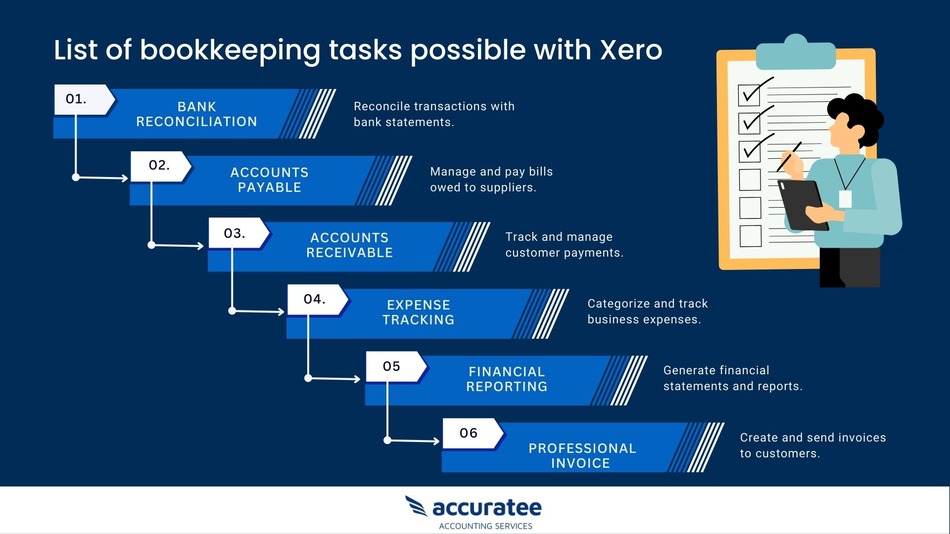
Bookkeeping is the process of recording and classifying every financial transaction in your business. In the past, that meant handwritten cashbooks, daybooks, and journals that were later posted into ledgers. Xero does the heavy lifting for you — in a few clicks you can create invoices, reconcile bank statements, track expenses, prepare financial statements, and process payroll.
Here are the common bookkeeping tasks your team (or your bookkeeper) can accomplish in Xero:
- Create and send invoices, and chase outstanding payments automatically.
- Connect bank feeds and reconcile accounts against real bank data.
- Record bills, pay them on time, and track supplier balances.
- Track expenses and manage receipts with receipt-capture apps.
- Process payroll, including Single Touch Payroll (STP) reporting to the ATO.
- Prepare profit and loss, balance sheet, and GST reports for BAS preparation.
Key Xero features for small business bookkeeping
Xero packs a range of features that let small business owners run their books efficiently. Here are the ones we use most when managing client files:
- Pay bills: track and pay bills on time, with clear visibility of upcoming outflows so cash flow forecasting is more accurate.
- Accept payments: get paid faster by accepting payments online through gateways like Stripe and GoCardless, with automatic matching to invoices.
- Track projects: generate quotes, convert them to invoices in one click, and keep an eye on the cost and profitability of each job.
- Financial reports: produce accurate profit and loss, balance sheet, and GST reports any time, and collaborate with your accounting adviser in real time.
- Analytics: get a snapshot of cash flow, sales, expenses, fixed assets, and unpaid bills in one place to guide quick decisions.
- Bank connections: connect bank accounts and set up feeds so transactions flow into Xero automatically, every business day, with no manual entry.
Benefits of using Xero for bookkeeping
Using Xero to manage your bookkeeping comes with a number of practical advantages for growing Australian businesses:
- Improved accuracy: automation reduces manual data-entry errors and the human mistakes that follow from them.
- Reduced costs: no expensive hardware or software upgrades, and less time spent on manual processes.
- Real-time access to data: your financials are available from anywhere, so decisions are made with current information.
- Integrations: Xero connects with a wide range of popular apps, keeping all your finances tracked in one place.
- Automated bank feeds: reconciliation becomes fast and accurate, reducing discrepancies and the risk of fraudulent transactions slipping through.
- Improved cash flow: track payments accurately, follow up on late invoices, and see exactly when money is coming in and going out.
- Secure data: Xero applies leading security measures and encryption, with two-step authentication available to protect your information.
- Currency conversion: send invoices in your customer's currency and record multi-currency transactions accurately.
- Tax compliance: GST reporting, PAYG, and STP payroll integration make it easier to stay compliant with ATO requirements.

Ready to hand your Xero bookkeeping to the experts?
Book a call with our team and keep your Xero file accurate, reconciled, and ATO-ready — without the late nights.
How to set up Xero for bookkeeping
Setting up Xero is a straightforward process. A bookkeeper can complete it in a session, or you can follow these steps yourself:
-
Create your Xero account
Sign up for the plan that suits your business and add any applicable add-ons, such as payroll or projects. Most Australian small businesses start on a mid-tier plan and scale up as they grow.
-
Add your business details
Enter basic information about your company, your financial year, and your GST settings, and set your default tax rates so transactions code correctly from day one.
-
Connect bank feeds and contacts
Link your bank and merchant accounts, then add suppliers, customers, and employees. Bank feeds bring transactions in automatically each day.
-
Customise your documents
Tailor invoices, bills, quotes, and purchase orders to match your brand, and set up payment terms and reminders.
-
Link your favourite apps
Connect Xero to services like PayPal, Stripe, Hubdoc, and inventory or CRM tools for a seamless, connected workflow.
Once these steps are done, you can start using Xero for bookkeeping straight away — accessing all your financial records from anywhere and keeping your books up to date with minimal effort.

Recording transactions and generating reports in Xero
Xero makes recording transactions easy. You can enter them manually or import records from a compatible file such as CSV or Excel. Once entered, transactions are categorised automatically based on the account and rules you've set up. You can review each transaction before it's posted, then reconcile it against your bank statement to ensure accuracy and reduce discrepancies.
Because the process is automated, managing your books becomes a breeze — saving you time and energy while keeping errors to a minimum. Xero also generates the reports you need to understand your business, including profit and loss statements, balance sheets, and sales summaries. Filters let you customise each report, and you can store and share them with stakeholders so everyone stays on the same page.

Wrapping up on Xero for bookkeeping
Keeping your books in Xero saves you time and money while giving you better insight into your business. With automatic bank feeds, reporting, and invoicing, Xero makes bookkeeping efficient — and with the right setup, it runs quietly in the background while you focus on your customers.
When you partner with CleanSlate, you get professional support from bookkeepers who are qualified BAS agents and experts in Xero. We set your file up properly, reconcile it each month, prepare your BAS, and keep you ahead of ATO deadlines — with speed, accuracy, and efficiency as our core values.

Partner with CleanSlate for Xero bookkeeping
Xero is a powerful tool, but it only works well when it's set up and maintained properly. At CleanSlate, our bookkeepers use Xero every day to keep our clients' books accurate, reconciled, and ready for BAS lodgement — so you can get back to running your business.
Here's what we bring to the table:
- Certified Xero expertise – clean setup, a tailored chart of accounts, and correct coding from day one.
- Monthly reconciliations – bank, credit card, and clearing accounts checked so your records are always reliable.
- BAS lodgement support – qualified BAS agents who prepare and lodge your activity statements on time.
- Cash flow clarity – real-time reports that show where your money is going, so you can plan with confidence.
Let our bookkeepers use their Xero expertise to get your books in order. Get in touch with us today and see how we can help you take control of your bookkeeping with Xero.
Bookkeeping in Xero FAQs
Yes. Xero is designed for small and growing businesses. It handles invoicing, bank feeds, expense tracking, payroll, and reporting, and scales with you as your transaction volumes increase.
Xero automates a lot of the data entry, but it still needs a knowledgeable person to set it up correctly, review transactions, reconcile accounts, and prepare your BAS. A bookkeeper ensures the software is used properly and your records stay accurate and compliant.
Xero is subscription-based and priced per month, depending on the plan and any add-ons like payroll or projects. A bookkeeper can help you choose the right plan for your needs so you're not paying for features you don't use.
Xero generates GST reports that feed into your BAS, and it can lodge activity statements electronically through registered tax or BAS agents. A qualified BAS agent reviews the figures before lodgement to catch errors and make the most of available concessions.
Xero uses strong security measures including encryption and two-step authentication. You control who can access your file, and user roles let you limit what each team member or adviser can see and do.